2.8 Bridge
Describes Voyager's bridge: its command area and the Conn, Ops, Tactical, aft, and side stations, plus notes on operating the ship's easy-to-use control panels.
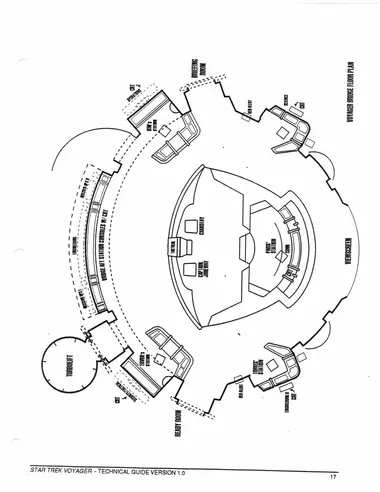
In brief: The prominent bulge at the top of the saucer-shaped primary hull of Voyager. This is the command center from which all the starship’s activities are coordinated.
Command area: At the center of the Main Bridge. Provides seating and information displays for Captain Janeway and First Officer Chakotay.
Conn: Short for “Flight Controller.” This is Tom Paris’ station, where he pilots the ship. It is a large stand-alone console located directly in front of the command area, and fulfills both helm and navigation functions.
Ops: Short for “Operations Officer.” This is Harry Kim’s station, located to the port aft side of the bridge. Ops is responsible for coordinating the activities of the ship’s departments and for allocating resources such as power, sensor usage, and computer time.
Tactical: Responsible for weaponry, defense, and internal security, this is a small dedicated console directly behind the command area. In crisis situations, this console can be occupied by Tuvok or another tactical officer.
Aft stations: These are three special-purpose consoles which include Engineering, featuring a large cutaway diagram of Voyager; and two Mission Ops consoles. N.D. crewmembers as well as our principal officers can work these stations.
Side Consoles: These are four specialist stations. Tuvok occupies the main Security/Tactical station at aft starboard; Harry Kim occupies the port aft Ops console; B’elanna Torres occupies the starboard forward Engineering station; and an N.D. crewperson can occupy the port forward Science console.
Notes on operating Voyager’s control panels: The most important thing to remember in using the control panels on the new starship Voyager is that they’re very easy to use. Like certain brands of automatic cameras, they’re so advanced, they’re simple.
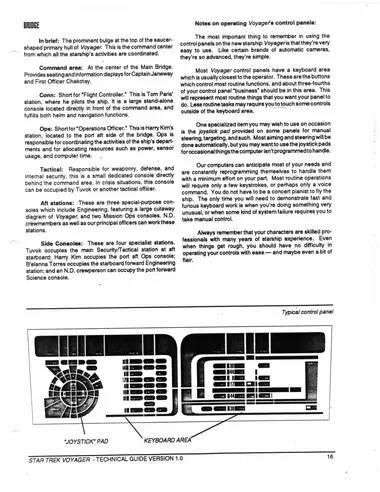
Most Voyager control panels have a keyboard area which is usually closest to the operator. These are the buttons which control most routine functions, and about three-fourths of your control panel “business” should be in this area. This will represent most routine things that you want your panel to do. Less routine tasks may require you to touch some controls outside of the keyboard area.
One specialized item you may wish to use on occasion is the joystick pad provided on some panels for manual steering, targeting, and such. Most aiming and steering will be done automatically, but you may want to use the joystick pads for occasional things the computer isn’t programmed to handle.
Our computers can anticipate most of your needs and are constantly reprogramming themselves to handle them with a minimum effort on your part. Most routine operations will require only a few keystrokes, or perhaps only a voice command. You do not have to be a concert pianist to fly the ship. The only time you will need to demonstrate fast and furious keyboard work is when you’re doing something very unusual, or when some kind of system failure requires you to take manual control.
Always remember that your characters are skilled professionals with many years of starship experience. Even when things get rough, you should have no difficulty in operating your controls with ease — and maybe even a bit of flair.